Accessibility For All Suite · Response

Response

Every solution, rolled into one set of next steps.

Response pulls your status from Documents, Websites, and ACR status into a single view, then turns it into suggested remediation steps — plain-language guidance on what to fix next and why it matters. It's the same rollup we send to your inbox every month, so nothing slips through the cracks between reviews.
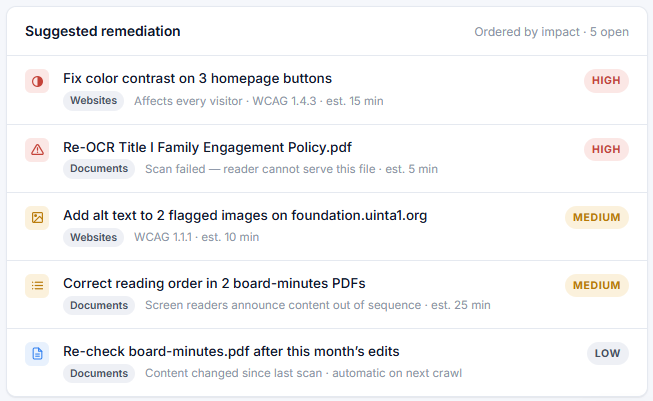
Sample Suggested Remediation report from Response: five prioritized fixes ordered by impact, spanning Websites and Documents, each with a WCAG reference, a plain-language description, and a High, Medium, or Low priority badge.

Sample report shown for illustration.

Most organizations that need one of Documents, Websites, or Reports end up benefiting from all four. See plans & pricing

What's inside

Every Response report covers the same four things

No digging through separate dashboards — Response pulls the headline number from each product into one place.

Documents

How many documents are compliant vs. non-compliant right now.

Website

Errors found on your last scan, and how that compares to last month.

Reports

Your VPAT's percentage complete, plus what's left before it's ready to certify.

Suggested next steps

Plain-language remediation guidance, prioritized by what matters most.

Delivered monthly

The same report, straight to your inbox

You don't have to log in and check. Every Response customer gets this rollup by email on a monthly cadence, so status changes and new suggestions never go unnoticed between reviews.

Monthly email preview
Your accessibility rollup — this month

14 documents compliant · 23 website errors (-8) · VPAT 68% complete

Top suggestion: fix color contrast on 3 homepage buttons.

See your own sample report

A walkthrough shows you exactly what Response would surface for your organization.

Part of the suite

Explore Accessibility For All

Four solutions that cover the full accessibility lifecycle. Use one — or all of them together.